Construction

Accounts Payable Automation: Construction

Designed for complex construction environments where project visibility, cost control and efficient approvals are essential.

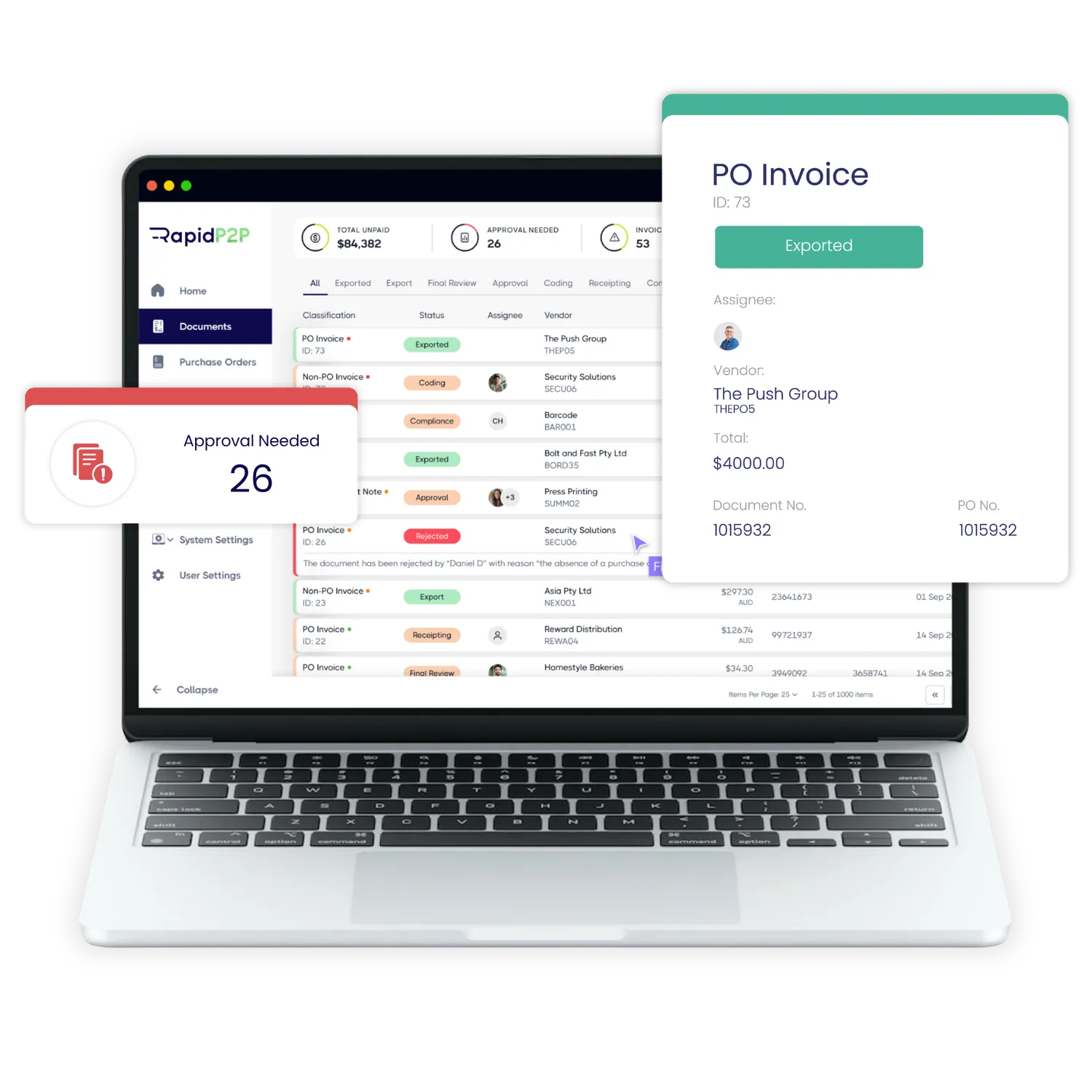
RapidP2P accounts payable automation dashboard showing invoice approvals
Trusted by finance teams across Australia and New Zealand

Customer stories

See How Lipman Automated Its Accounts Payable Process

Lipman integrated RapidP2P with Jobpac and Eftsure to reduce manual handling and improve invoice processing across its finance operations.

green tick
3,000+ monthly invoices automated
green tick
Reduced manual handling
green tick
Greater visibility across procurement and project-level finance workflows
green tick
Stronger vendor compliance
We were coming from a place where everything was entirely manual… The Efficiency Leaders tool had the best extraction rate by far… This integration with JobPac has positioned us ahead of the pack and allowed our team to refocus on higher-value tasks.
Andrew Lander
Financial Controller

Construction ap bottlenecks

Reduce the AP Bottlenecks That Slow Down Your Projects

Construction finance teams manage invoices across projects, sites, entities, suppliers, subcontractors and approval chains. RapidP2P brings those moving parts into a governed AP automation workflow that supports visibility, control and ERP accuracy.

Visibility icon

Fewer bottlenecks. Better Visibility.

Projects delivered on time and on budget.
Supplier query icon

Supplier query about invoice status

Pending action icon
Missing approval from site or project team
Bank details change icon
Bank-detail or vendor master data change
Invoice mismatch icon

PO mismatch or job coding issue

The RapidP2P platform

One connected workflow, from new supplier to paid invoice

Start with accounts payable and add the rest when you’re ready. Every module shares the same delegations, audit trail and ERP connection.
RapidP2P Vendor Onboarding (VO) icon

Onboard

Vendor Onboarding

Suppliers enter their own ABN, bank and insurance details, verified before first payment.

RapidP2P Procurement and Purchase Orders (PO) icon

Buy

Procurement and Purchase Orders

Raise and approve POs against budget before money is committed.

RapidP2P eInvoicing (EI) icon

Receive

eInvoicing

Receive Peppol eInvoices straight into the workflow, no keying required.

Where most teams start

RapidP2P Accounts Payable Automation (AP) icon

Process and approve

Accounts Payable Automation

Capture, check, match and route every invoice under your delegations.

RapidP2P Vendor Portal (VP) icon

Pay and self-serve

Vendor Portal

Suppliers check invoice and payment status themselves, so AP takes fewer calls.

RapidP2P accounts payable automation dashboard showing invoice approvals
Peppol eInvoicing logo

Supporting Peppol eInvoicing in Construction

Construction finance teams manage vendor invoices across multiple projects and sites, with each invoice needing accurate job allocation and approval from the right people.
RapidP2P supports Peppol eInvoicing, allowing construction organisations to receive structured invoice data from vendors connected to the Peppol network and process it within the same controlled accounts payable workflow as other invoices.
icon 513
icon 511
icon 512
Visibility icon

Built-in Peppol support for construction finance

Reduce manual invoice handling and improve data quality while keeping your project approval paths, financial controls and ERP-connected workflows in place.

ERP-Connected for Construction Environments

RapidP2P supports finance teams using construction and enterprise systems across Australia and New Zealand.

AP AUTOMATION FOR CONSTRUCTION

Why Construction Teams Choose Efficiency Leaders

Low-commitment next step

Not ready for a full demo?

Book a 30-minute construction AP assessment to discuss invoice delays, approval bottlenecks, supplier queries and ERP workflow gaps.
green tick
Expert feedback
green tick
30 minutes via Teams
green tick
No obligation

Start with a Short AP Assessment

A simple conversation if you are not ready for a full product demo.

FAQs

Construction AP Automation FAQs

Can’t see yours? Ask our team.

What should construction companies look for in AP automation software?

Look for compatibility with your construction ERP, support for PO and non-PO invoices, project approval requirements, duplicate checks and visibility into invoice progress and approval status. Use a demonstration to test missing POs, coding requirements and approvals across sites. The software should make responsibilities clearer for both finance and project teams.

Automating capture, data extraction, validation and approval routing reduces repeated data entry and email handling. RapidP2P brings these steps into a connected workflow, so construction finance teams can focus on invoices needing attention, such as missing purchase orders, supplier-data issues or approval delays, rather than manually handling every step.

Efficiency Leaders’ RapidP2P integrates with Jobpac to connect accounts payable and supplier workflows. Lipman uses RapidP2P with Jobpac and Eftsure and reports processing large invoice volumes with minimal manual input. Integration scope is confirmed for each customer’s ERP environment and process requirements.
Route invoices through agreed approval workflows rather than relying on separate email chains. RapidP2P supports notifications, escalations and task reassignment, with visibility over invoices waiting for action. Workflows can reflect site and entity responsibilities, helping finance identify delays while project teams retain the approvals required by your policy.

RapidP2P is configured during implementation to reflect your ERP’s job, cost code, and GL structure.

The design identifies the coding fields, the people responsible for checking them and the data passed to the ERP. RapidP2P supports site and entity configuration, with coding issues handled through the agreed review process before an invoice proceeds.
RapidP2P can identify missing or incorrect PO references through configured validation checks and route the invoice for review. Differences outside agreed tolerances and supplier-data issues can also trigger an exception. The responsible team resolves the issue before the invoice continues through the agreed process.

Yes. RapidP2P shows invoices received into the platform, including approval progress and exceptions. This helps finance review supplier costs that have not yet completed approval or reached the ERP. Finance can use that information during month-end, alongside its own accrual assessment and other project-cost records.

Use duplicate checks, supplier validation and clear approval responsibilities at different stages of the process. RapidP2P can also leverage third-party fraud detection platforms like Eftsure bank verification by direct integration to existing licenses . These checks help identify issues before payment; supplier changes, exceptions and payment authorisation still require appropriate review.

Yes. RapidP2P Procurement supports purchase requisitions, purchase-order creation and approvals before buying takes place. This makes purchasing decisions visible earlier and gives finance an approved record to reference when the supplier invoice arrives, rather than leaving project teams to reconstruct the purchase during invoice approval.