Accounts Payable Automation · Australia & New Zealand
Accounts payable automation software that fits your ERP
Less manual work. More control over every invoice.

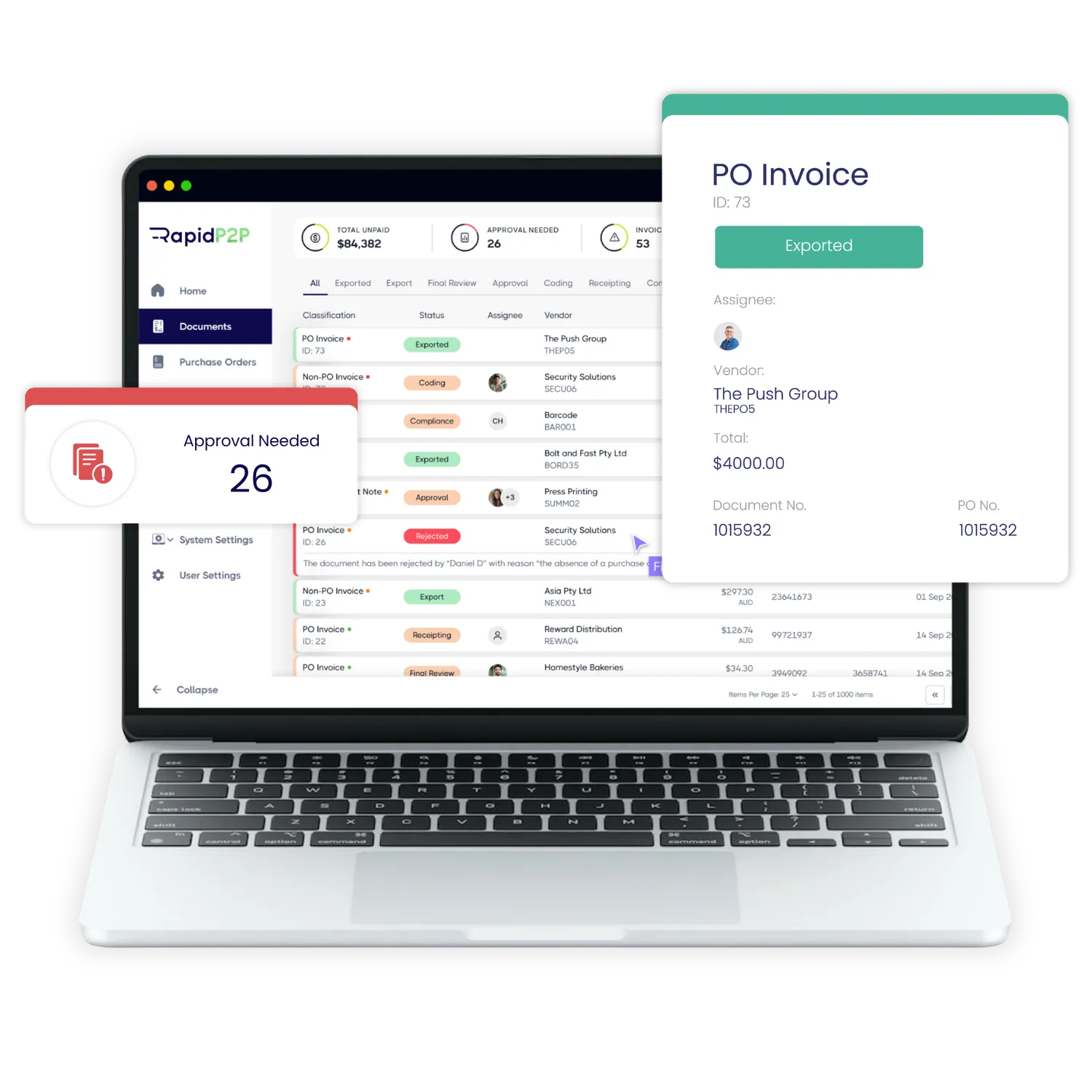
RapidP2P is accounts payable automation software that captures, checks and routes supplier invoices for approval, then passes approved data to your ERP. Less keying and chasing for AP, clearer visibility for finance.
Local implementation and support from Sydney, the Gold Coast and Christchurch.
Why finance teams choose RapidP2P
Low disruption
Your ERP stays in charge
Not sure your ERP’s AP module is enough? Read what an ERP handles on its own, and what it leaves with your AP team, or see our best practices for accounts payable invoice processing.
Governance
Controls that hold up at audit
Capacity
More invoices, same team
The problem
The problem isn't only data entry.
It’s the time spent finding invoices, chasing approvals, checking for errors, resolving exceptions and proving what happened later. That’s the work accounts payable process automation removes, without replacing your ERP.
- Finding invoicesShared inboxes, scans, post
- Chasing approvalsEmail follow-ups
- Checking for errorsManual rechecking
- Resolving exceptionsNo clear owner
- Proving what happenedAudit trail gaps
How RapidP2P processes an invoice
RapidP2P Accounts Payable Automation, also known as RapidAP, is the accounts payable module of Efficiency Leaders’ RapidP2P procure-to-pay suite. Its invoice automation receives supplier invoices, extracts and checks the data, including the supplier’s ABN and GST details, matches and codes each invoice, routes it for approval and sends approved invoices to your ERP for posting and payment.
Receive
Capture and check
Invoice data is extracted and checked against vendor and PO data, including ABN and GST details. Possible duplicates are flagged.
Match and code
Approve and resolve
Post in your ERP
BY ROLE
See how your procure-to-pay process connects
Lower cost per invoice, without adding headcount
A cleaner, more predictable month-end
Less keying, less chasing, fewer supplier calls
Integration without disruption
Your ERP stays the system of record for posting and payment.
Controls you can evidence
Vendor details verified through Vendor Onboarding before the first invoice.
Customer results
Results finance teams can measure
80%
reduction in invoice processing time
Up to 90%
fewer invoice-entry keystrokes
2 weeks → 1 day
for invoice approvals that once took up to two weeks
1 FTE
full-time role freed from manual data entry
Your ERP stays the system of record
RapidP2P works alongside your ERP, the accounts payable system of record you already have, rather than replacing it. Each integration is scoped to your ERP version, modules and data requirements.
Handles everything before posting
- Invoice receipt and data capture
- Validation and duplicate checks
- PO matching and coding
- Approvals and exceptions
Posting, payment and reporting stay here
- Posting to the ledger
- Payment runs
- Vendor, PO and GL master data
- Financial reporting
Works with TechnologyOne Microsoft Dynamics Oracle NetSuite SAP Business One Civica Authority Jobpac
Don’t see your ERP? Ask us what integration would involve, or explore ERP integrations.
Built for complex finance structures
Multi-entity
Approvals by entity and site
Segregation of duties Coming soon
Separate entry, approval and payment
Audit history
Every decision on record
Access
SSO and role-based access
Hosting
Hosted on Microsoft Azure
Assurance
ISO/IEC 27001 certified
Compare your options
How the options compare
Most finance teams weigh three options. Here's where each one usually fits.
| What to check | RapidP2P | AP tools built for small businesses | Your ERP's AP module |
|---|---|---|---|
| Multiple entities and sites | Approval rules by entity and site | Often limited, or handled as separate accounts | Supported, but setup can be rigid |
| Delegation of authority | Follows your delegations | Simple approval chains | Supported in most ERPs |
| Exception handling | Mismatches, missing details and credit notes managed in one workflow | Basic | Often left to the AP team |
| Invoice capture and coding | Automated capture and coding | Usually included | Often needs add-on tools |
| ERP integration | TechnologyOne, Civica Authority, Dynamics, NetSuite, SAP Business One, Jobpac and more | Mostly Xero and MYOB | Native |
| Peppol eInvoicing | Built in | Varies | Varies |
| Data hosting | Microsoft Azure | Varies | Depends on your ERP |
| Best fit | Mid-size to enterprise, and government | Small businesses | Simple, PO-backed invoices |
Weighing your ERP's own AP module? Read what an ERP handles on its own, and what it leaves with your AP team.
TechnologyOne recommended Efficiency Leaders, and it’s been great so far.
Robin Hint, Coordinator of Financial Services
AP cost
What's manual AP costing you?
Estimate your current invoice processing cost and the savings automation could deliver.
Start with AP. Expand to procure‑to‑pay
Procurement
Approved purchase orders before spend is committed.
Vendor Portal
Suppliers submit invoices and check status themselves.
Vendor Onboarding
Verified vendor details before they reach the ERP.
eInvoicing
Receive Peppol eInvoices straight into AP.
What is accounts payable automation?
Accounts payable automation is software that handles supplier invoices from receipt to ERP posting with far less manual work. It captures invoice data, checks it against supplier and purchase order records, routes each invoice for approval and passes approved data to your ERP for payment. RapidP2P does this for Australian and New Zealand finance teams.
Can AP automation process different invoice types received by email?
How is accounts payable automation different from invoice OCR?
Can AP automation handle invoices with and without purchase orders?
How can we speed up invoice approvals without chasing people by email?
How can AP automation help prevent duplicate invoice payments?
How can AP automation reduce invoice fraud risk?
What should an Australian finance team compare when choosing accounts payable automation software?
Compare accounts payable automation solutions on support for your invoice types, approval rules, supplier checks, exceptions and ERP environment. Use your own invoices in a demonstration, including a missing PO, a duplicate submission and an approval delay. Review implementation responsibilities, security, support and total costs as well as how the platform handles straightforward invoices.
Can approvals follow our delegation of authority across entities?
Yes. Approval rules in RapidP2P follow your delegations of authority across entities and sites, so each invoice goes to the right approver based on its entity, amount and coding. Every decision is recorded against the invoice.
What happens when an invoice fails a validation or matching check?
Can RapidP2P check supplier ABN and GST details?
Yes. For Australian suppliers, RapidP2P validates the ABN against the Australian Business Register (ABR) and checks GST registration status, with compliance rules for suppliers that aren’t registered for GST, so GST isn’t claimed in error. For New Zealand suppliers, it validates the GST number using its check digit. Invoices are then checked against these validated supplier records, and mismatches are flagged for review. Read more about accounts payable automation in New Zealand.
Can AP automation help us process more invoices without increasing headcount?
Can finance see invoices that haven't yet been approved or posted to the ERP?
Can we automate accounts payable without replacing our ERP?
How should we calculate the return on AP automation?
What's involved in implementing AP automation, and what will our team need to do?
Where is our data hosted, and is RapidP2P ISO 27001 certified?
RapidP2P is hosted on Microsoft Azure cloud infrastructure. Efficiency Leaders holds ISO/IEC 27001:2022 certification for its Information Security Management System. You’ll find more detail in our Trust Centre.
Start with a 30‑minute AP assessment
What you'll take away
- A clear view of where time goes in your current AP process
- The approval delays and exceptions worth fixing first
- How your ERP and approval structure would fit an automated process
- Practical next steps for your team